
Appearance
Lost & found
Every printed label carries a lost & found address. This page covers the found-portal story from both sides: what a finder sees when they scan a lost case, and what your workspace sees when a report comes in.
Why this exists
Gear leaves the building on jobs, and sometimes a case gets left behind at a venue or found by someone who has nothing to do with your production. Before this existed, an anonymous scan of a lost item's QR code just landed on Shelf's generic sign-in page — useless to someone who doesn't have (and shouldn't need) an account. The found portal replaces that with a branded, mobile-first "report this found" flow at an address printed right on the label: found.artgrp.au (or your brand's own found-portal address, if your workspace uses a different brand).
For a finder
A finder doesn't need to know anything about Shelf. They either scan the QR code directly, or — if the QR won't scan (a scuffed label, no camera app handy) — type the printed code manually into the portal's landing page.
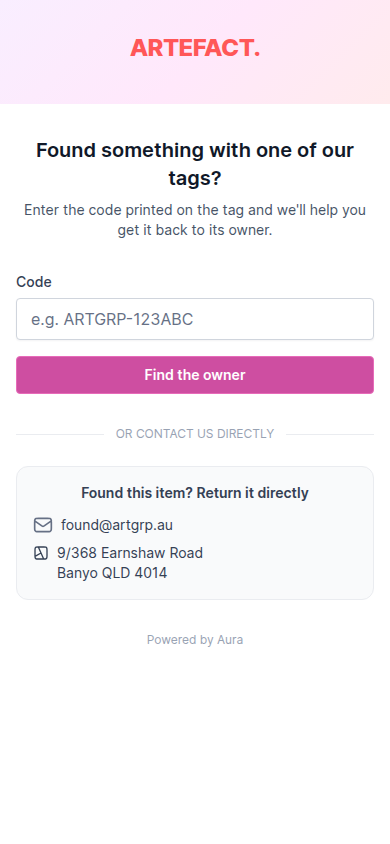
What they see next depends on the code's state:
- Linked to a specific asset or kit — the item's title and category, and your workspace's public contact details (a lost & found email and/or address, if you've set one — otherwise a sensible default).
- A blank/unclaimed label — a "this code hasn't been linked to anything yet" state.
- An unknown or deleted code — a plain "we don't recognise this code" page.
In every case, the finder can fill in a short report — their name (optional), an email or phone to be reached on, a message, and (if they allow it) their current location — and submit it. There's no account, no app to download, and the form is rate-limited and honeypotted against spam.
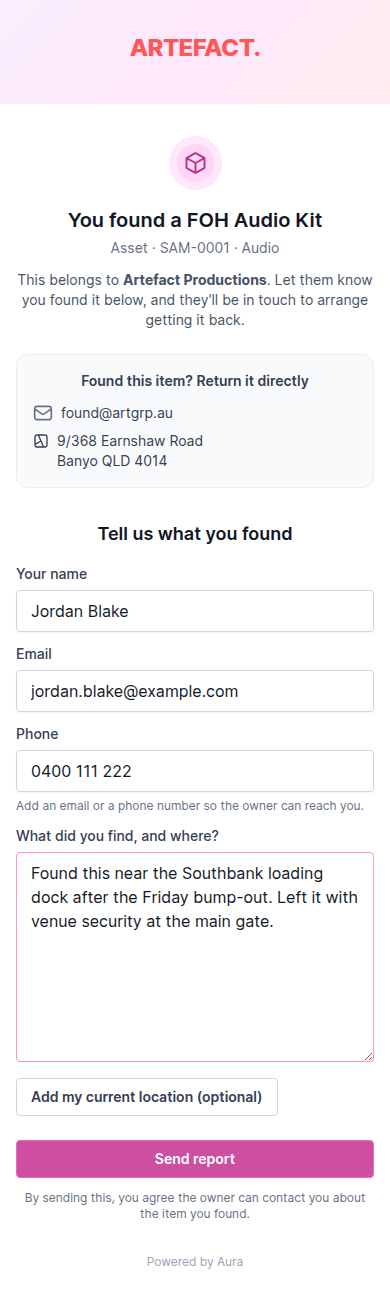
The never-leak rule, strictly enforced: a public found-portal response never includes an item's valuation, custody history, stored location, notes, or any custom field — regardless of who's asking. A finder learns what the item is and who to contact, nothing more.
For your workspace
Reporting an item found does several things automatically:
- Your workspace's Owners and Admins get an email with the finder's details and message.
- The finder gets their own confirmation email.
- If the code is linked to an asset, a note is added to that asset's activity so anyone opening it later sees the found-report right there in its history, and the asset's "last reported found" timestamp is updated.
The dashboard surfaces recent found reports in your chosen date range, each linking straight through to the asset or kit it was reported against (when the code was linked to one).

There's no separate "resolve" step in the product today — a report is a notification and an activity note, not a ticket with its own status. If your team wants to track "have we actually got this item back yet", that's currently a conversation followed up outside Shelf (over the email the report generates), not a workflow the app enforces.
Related
- Assets, kits & labels — what's printed on the label a finder scans
- Printing labels — every label carries the found address, at every tape size
- Barcodes & codes — the six characters a finder types in
- How Shelf works — where the found portal fits in the bigger picture
- Glossary — found portal, defined alongside the other terms it's easy to mix up